
Introduction
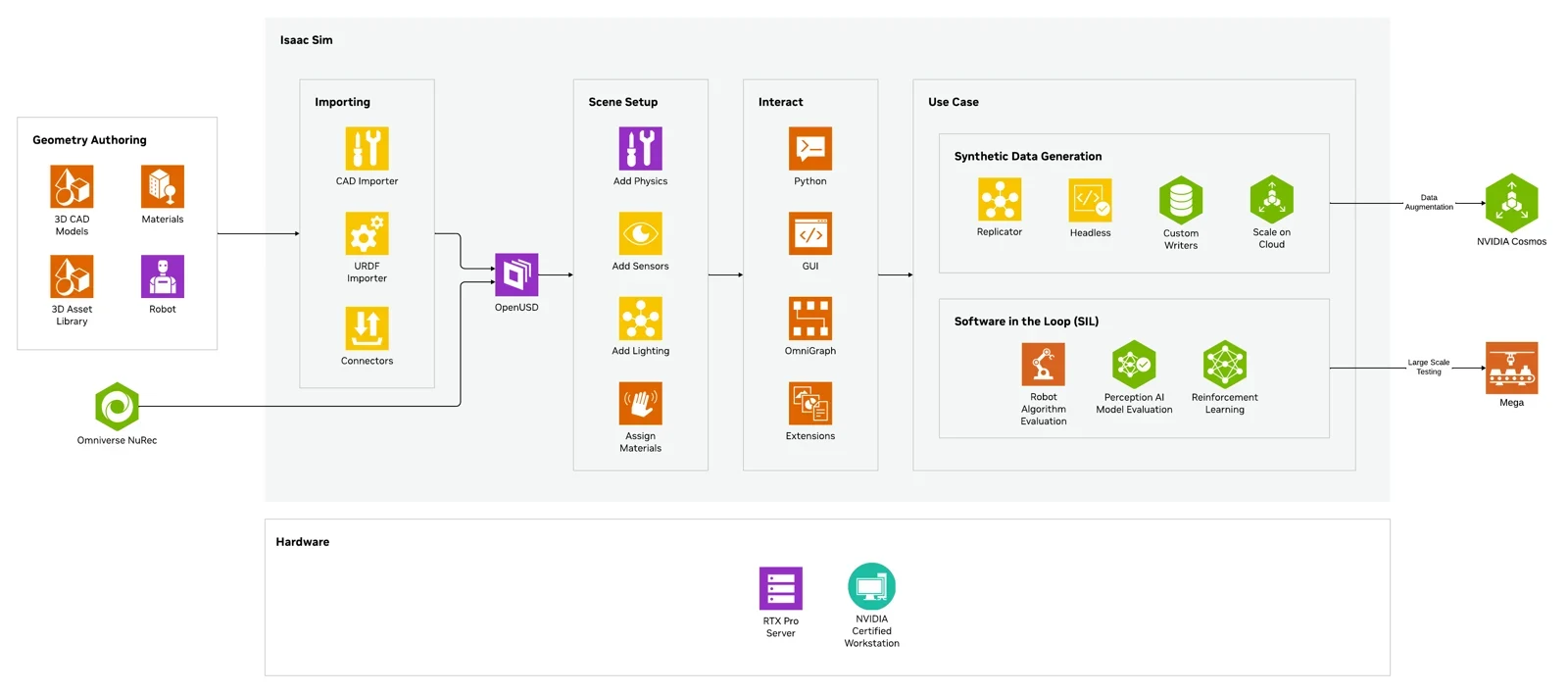
Trying to force Isaac Sim onto a laptop with integrated graphics is usually the wrong battle. The simulator is built around RTX rendering and GPU-accelerated physics. A weak laptop can still be useful, but it should act as the screen, keyboard and browser while the expensive work runs somewhere else.
The clean setup is simple: keep your current computer, rent or launch a remote NVIDIA GPU, open Isaac Sim there and stream the interface back to your browser. Once that works, you can load Unitree H1, inspect joints, add sensors, import your own URDF and move into Isaac Lab without buying a workstation first.
Research date 2026-09-09. Source review date recorded for this article September 9, 2026.
Direct answer
You cannot realistically run current Isaac Sim locally on a weak integrated GPU. The practical setup is laptop → browser → remote RTX GPU → Isaac Sim. NVIDIA documents cloud and streaming workflows, and its Isaac Launchable on Brev provides a browser-based VS Code environment plus a streamed Isaac Sim session.
Key findings
- NVIDIA lists an RTX-class GPU requirement for current Isaac Sim workstation use; a weak integrated GPU is not a practical local target.
- A remote GPU lets the laptop act only as the client while simulation, rendering and physics run on the server.
- NVIDIA Isaac Launchable on Brev is one documented browser-based route for running Isaac Sim and Isaac Lab remotely.
- Unitree H1 is a useful first humanoid because NVIDIA provides a known asset and rigged locomotion workflow.
- A custom humanoid should be imported only after a known robot works, so joint, collision and controller problems are easier to isolate.
Ways to use Isaac Sim when your computer has no suitable GPU
The key decision is where the RTX workload runs. With a weak laptop, move rendering and simulation to a remote GPU rather than trying to force local execution.
| Setup | Where Isaac Sim runs | What your laptop does | Best use |
|---|---|---|---|
| NVIDIA Brev / Isaac Launchable | Remote NVIDIA GPU | Browser, keyboard, mouse, display | Fastest documented path for learning and browser access |
| Cloud VM with RTX GPU | Remote cloud server | Remote desktop or streaming client | Custom server control and longer projects |
| Local workstation | Your own RTX computer | Runs everything locally | Best only when you already own supported hardware |
Check the current Isaac Sim requirements page before choosing a cloud GPU because requirements change by release.
What using Isaac Sim without a GPU really means
Isaac Sim still needs GPU compute. The workaround is not CPU-only simulation on your laptop. The workaround is moving the GPU to another machine. Your browser becomes the client while the remote server handles RTX rendering, physics, sensors and simulation.
This distinction saves a lot of wasted setup time. A laptop with integrated graphics can display the streamed session even though it would be a poor machine for running the simulator itself.
Think of the setup as laptop → browser → remote RTX GPU → Isaac Sim.
Step 1: check the current hardware requirements
Open NVIDIA’s current Isaac Sim requirements page before renting anything. For Isaac Sim 6.0.1, NVIDIA lists 32 GB of system RAM and an RTX 4080 with 16 GB VRAM as the minimum x86_64 workstation GPU configuration. Cloud instances should be selected with the actual workload in mind, especially when you add cameras, RTX sensors or many parallel environments.
Do not copy an old requirements table from a forum post. Isaac Sim requirements are release-specific and NVIDIA updates them.
- Open the official Isaac Sim 6.0.1 requirements page.
- Check GPU model and VRAM first.
- Check system RAM and storage.
- Choose a cloud instance that meets or exceeds those requirements.
Step 2: create a remote Isaac Sim machine with NVIDIA Brev
NVIDIA documents an Isaac Launchable workflow on Brev. It is useful for beginners because the environment is already built around Isaac Sim and Isaac Lab instead of making you assemble the stack manually on a generic virtual machine.
Create a Brev account, open the Isaac Launchable and deploy it. Wait until the instance reports that it is running and the setup has finished before opening the development environment.
- Open the NVIDIA Isaac Launchable documentation.
- Choose Deploy Launchable.
- Sign in to NVIDIA Brev.
- Create the instance and wait for the build to complete.
- Stop the instance when your session is over so the GPU is not left running idle.
Step 3: open browser VS Code and start the streamed simulator
The Brev Launchable exposes a secure browser link. Opening it gives you VS Code running on the remote machine. The terminal inside that page is remote too, so commands execute on the GPU server rather than on your Windows laptop.
Use the README supplied inside the Launchable for the current Isaac Sim startup command. Once the simulator starts, open the streaming link in another browser tab. Keep VS Code open for scripts, logs and file uploads.
- Open the secure link on the Brev instance page.
- Authenticate and confirm browser VS Code loads.
- Read the Launchable README.
- Run the documented Isaac Sim launch command.
- Open the provided streaming URL in another tab.
Step 4: build one empty physics scene first
Do not load a humanoid immediately. Create a new scene, add a Physics Ground Plane and a Distant Light, then find the Stage, Viewport, Property panel and timeline.
Press Play. A robot can look correct while physics is stopped and collapse the moment gravity, contacts and joint drives become active. Learning this distinction early makes later debugging much easier.
- Choose File → New.
- Add Create → Physics → Ground Plane.
- Add a Distant Light.
- Locate the Stage, Viewport and Property panel.
- Press Play and confirm physics runs normally.
Step 5: load Unitree H1 before importing your own humanoid
A known robot is a better starting point than a custom URDF. NVIDIA includes Unitree H1 assets and documents a rigged H1 locomotion workflow, giving you a reference whose joint hierarchy and expected setup are known.
Use the Content Browser for the standard H1. For locomotion work, NVIDIA documents a rigged H1 USD under the samples path.
- Open the Content Browser.
- Navigate to Unitree H1.
- Load the standard H1 and inspect it.
- Use h1_rigged.usd when following the locomotion workflow.
Isaac Sim/Robots/Unitree/H1
Isaac Sim/Samples/Rigging/H1/h1_rigged.usd
Step 6: inspect joints before trying to walk
A humanoid is an articulation, not one rigid mesh. Hip, knee, ankle, torso, shoulder and elbow joints all have limits, drives and dynamics. Open Physics Inspector and look at the joint configuration before changing controllers.
A robot that falls immediately may have a bad starting pose, weak drive gains, incorrect inertia, collision problems or no balancing policy. A good-looking 3D model does not prove stable locomotion.
- Open Tools → Physics → Physics Inspector.
- Select the H1 articulation.
- Inspect joint limits, position, stiffness, damping, effort and velocity.
- Use this known robot later as a comparison for your own humanoid.
Step 7: use a locomotion controller, not manual leg animation
For walking, use NVIDIA’s H1 locomotion example or an Isaac Lab workflow instead of rotating the hip and knee joints by hand. Locomotion depends on balance, contact timing, state estimation and actuator behavior.
The rigged H1 is useful because it shows the difference between having a simulated body and having a controller that can keep that body upright while moving.
When the robot falls, debug pose, contacts, actuators and controller state before blaming the visual asset.
Step 8: add cameras and an IMU only after basic physics works
Once the humanoid can stand or move under a known controller, add sensors. A practical humanoid scene may use head RGB cameras, depth cameras, wrist cameras, a pelvis IMU and contact or effort sensing.
Adding every sensor at the beginning increases GPU memory use and makes failures harder to isolate. Start with the observation set required for the task.
- Head RGB camera for scene understanding
- Depth or stereo camera for geometry
- Pelvis IMU for body motion and orientation
- Wrist cameras for close manipulation views
- Contact or effort sensing for physical interaction
Step 9: upload and import your own humanoid URDF
After H1 works, move to your own robot. Upload the entire robot folder to the remote machine, including the URDF and every referenced mesh or texture. Uploading only the URDF often produces missing geometry because the file points to external assets.
Use Isaac Sim’s URDF importer to convert the robot into a USD-based asset. For a walking humanoid, be careful with Fix Base Link. Fixing the base is useful for a robot arm bolted to a table, but normally wrong for a free-moving biped.
- Upload the complete robot folder through browser VS Code.
- Open the URDF importer in Isaac Sim.
- Select the URDF on the remote filesystem.
- Keep the base free for a walking humanoid unless your design requires otherwise.
- Import, inspect the articulation and save the result as USD.
my_humanoid/
├── humanoid.urdf
├── meshes/
│   ├── pelvis.stl
│   ├── thigh_left.stl
│   └── feet.stl
└── textures/
Step 10: check collisions before controller tuning
A robot can look perfect in the Viewport and still have unusable collision geometry. Feet can penetrate the floor, thighs can collide with each other or oversized collision meshes can make the body explode apart when physics starts.
Inspect collisions, inertial values and joint axes before spending time tuning a policy. Mechanical-model errors often look like controller failures.
- Feet should make clean contact with the ground.
- Adjacent links should not start in self-collision.
- Joint axes should match the intended mechanical motion.
- Mass and inertia should be plausible for each link.
- Collision meshes should be simple enough for stable simulation.
Step 11: build one small task before a full factory
Put the humanoid on a floor with one table, one box and one target location. Test standing, walking, reaching and camera placement separately before importing a large factory scene.
A small scene gives you cleaner failure signals. When the robot cannot reach a box, you can focus on kinematics, perception, contact or control instead of hundreds of unrelated assets.
- Create one floor and one table.
- Spawn the humanoid in a repeatable start pose.
- Add one object to inspect or manipulate.
- Test navigation and manipulation separately.
- Add conveyors, shelves and factory equipment only after the simple task is reliable.
Step 12: move to Isaac Lab when you need robot learning
Isaac Sim provides the simulation platform. Isaac Lab is the robot-learning framework built on top of it. Move into Isaac Lab when you need reinforcement learning, parallel environments, policy training or structured robot-learning tasks.
Cloud GPUs become especially valuable here because many parallel environments can use much more GPU memory than one interactive scene.
- Locomotion policy training
- Push recovery
- Reaching and manipulation
- Whole-body control
- Domain randomization
- Parallel environment evaluation
Stop the cloud GPU when you finish
Cloud GPU cost continues while the machine is running. Save the project, confirm important files are on persistent storage and stop the GPU instance when you are done.
Record the Isaac Sim version, driver, project commit and important extension versions so you can reproduce the environment later.
- Save the USD scene and scripts.
- Back up or commit important files.
- Close the streamed session.
- Stop the Brev or cloud GPU instance.
- Verify the instance is no longer running before leaving it overnight.
Limitations and missing information
- The phrase without a GPU means without a suitable local GPU; Isaac Sim still runs on a remote NVIDIA GPU in this workflow.
- Cloud pricing and available GPU instance types vary by provider and region.
- Isaac Sim hardware requirements and Launchable instructions can change between releases.
- A humanoid loading successfully does not mean it can balance or walk; locomotion still needs correct physics and control.
Conclusion
The practical way to learn Isaac Sim on a weak computer is to stop treating the laptop as the simulator. Use it as the client. Run the RTX workload remotely, verify the environment with Unitree H1, then add your own robot one layer at a time.
That order matters. When the known H1 works before your custom URDF, every later failure becomes easier to diagnose: geometry, joints, collisions, sensing or control instead of an unknown combination of all five.
Frequently asked questions
Can Isaac Sim run without an NVIDIA GPU in my laptop?
Yes, when Isaac Sim itself runs on a remote NVIDIA RTX GPU and you stream the interface to the laptop. This is different from running the simulator locally without GPU acceleration.
Can I run Isaac Sim only on CPU?
Current Isaac Sim is designed around RTX GPU acceleration. For a weak or integrated-GPU computer, use a remote supported NVIDIA GPU rather than planning a CPU-only local workflow.
What is the easiest cloud route for a beginner?
NVIDIA documents an Isaac Launchable on Brev that exposes browser VS Code and a streamed Isaac Sim environment. Check the current Launchable documentation before deployment.
Which humanoid should I load first?
Unitree H1 is a useful first reference because NVIDIA provides H1 assets and a documented rigged locomotion workflow.
Can I import my own humanoid?
Yes. Upload the full URDF project with meshes and textures to the remote machine, import it with the Isaac Sim URDF importer, inspect collisions and joints, then save the result as USD.
Do I need Isaac Lab immediately?
No. Learn Isaac Sim scene setup, physics and a known humanoid first. Move to Isaac Lab when you need robot-learning workflows such as reinforcement learning or parallel environments.
Sources and methodology
This guide was rebuilt on September 9, 2026 around the current NVIDIA Isaac Sim 6.0.1 documentation, including hardware requirements, cloud deployment, Isaac Launchable on Brev, Unitree H1 rigging and the URDF importer.
The existing URL is preserved. The article now follows the order a beginner would actually use: choose remote compute, launch Isaac Sim, verify physics with a known humanoid, then import a custom robot.
Related TechniaHQRobot guides
Share this article
Share the current TechniaHQRobot article page.
Continue reading
Open the latest robotics reporting, Physical AI analysis and hardware notes.